Person-centred rostering, time & attendance and payroll
Staff Rota
Build staff rotas around the people you support: scheduling, open shifts, leave, location-stamped clock-in, timesheets and payroll-ready exports, all tied to each person's care record. An optional bolt-on.
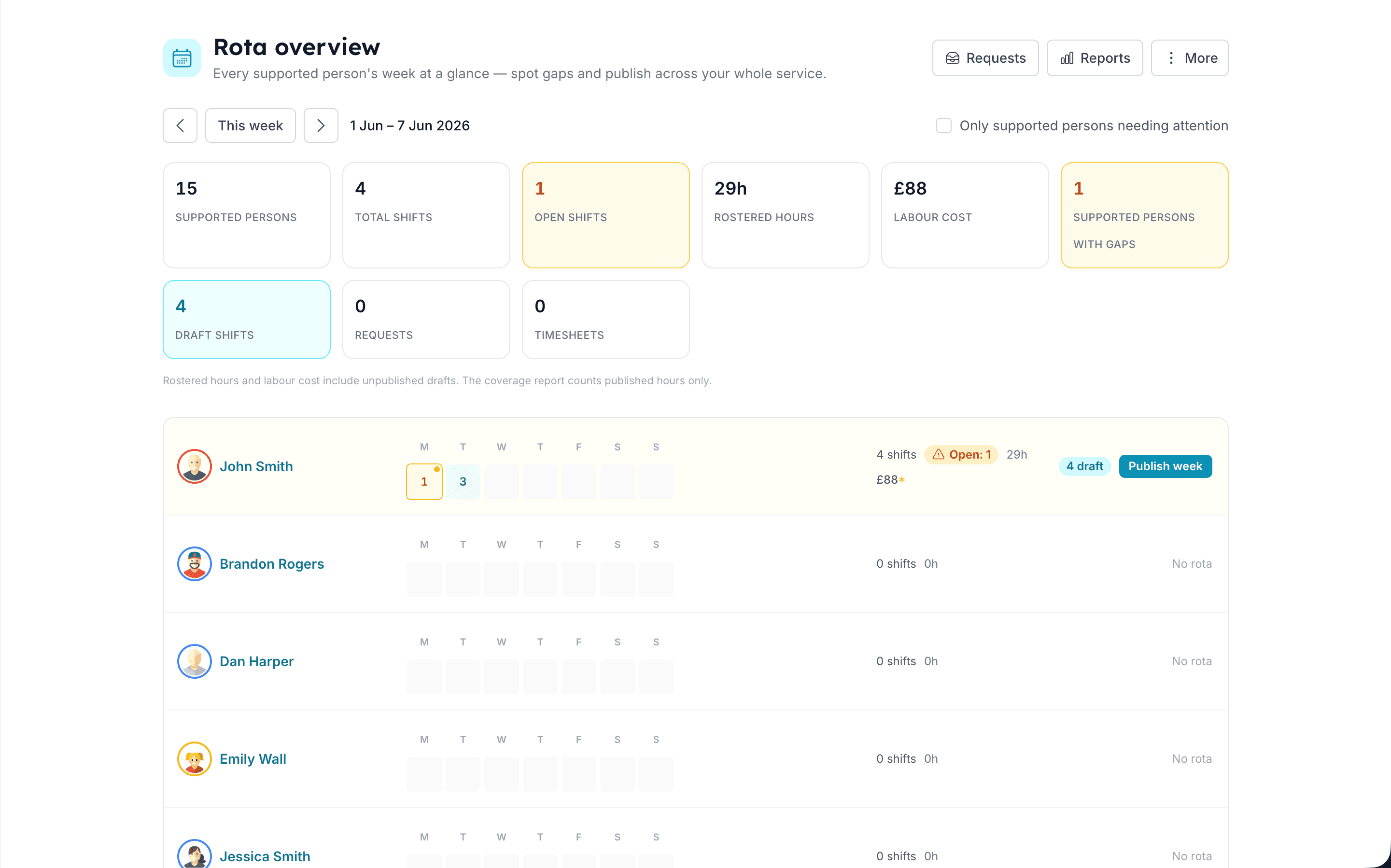
Build the rota in minutes
A week's rota, drag-and-drop simple
- Drag-and-drop builder
- Create, move and resize shifts with live clash-checking, scoped to each person you support.
- Copy a week, or save a pattern
- Duplicate last week in a click, or save a multi-week pattern as a template and apply it forward, with clash handling you control.
- Templates & one-click publish
- Save a proven week as a reusable template, then publish when ready. Staff are notified instantly.
Fill the gaps without the phone-round
Let staff pick up open shifts
- Open shifts staff can claim
- Publish a gap and let the team self-serve, with conflict-safe, race-proof claiming.
- One personal rota per carer
- Every staff member sees all their upcoming shifts in one place, across every person they support.
- Shift acknowledgements
- Carers confirm they've seen their shifts, so you know the rota has actually landed.
Leave & availability, handled properly
Time off that adds up correctly
- Self-service leave & approvals
- Colour-coded paid, unpaid and TOIL leave types, approved or declined with a message.
- Holiday allowances in hours
- Annual entitlement, carry-over, taken and remaining, calculated automatically against your leave year.
- Availability patterns
- Staff set when they can and can't work as one-offs or repeating weekly, fortnightly or 4-weekly patterns.
Time & attendance you can trust
Clock in on location, with proof
- Geofenced clock-in
- Location-stamped punches with a per-person radius. Off-site clock-ins are blocked, with the distance shown.
- Breaks & lateness
- Breaks tracked against the shift; clock-ins compared to the scheduled start with a configurable grace period.
- Mobile & web clock-in
- Works from the mobile app (even offline) or the browser, with GPS location stamped on each clock-in.
Payroll-ready, every period
From approved time to your payroll, in minutes
- Self-building timesheets
- Approve or correct each timesheet in a tap; paid-break logic is preserved automatically.
- Overtime & sleep-in, by the rules
- A weekly hours threshold splits basic vs overtime per person; flat or hourly sleep-in rates are priced in.
- Lock & export to Sage 50
- Finalise a run to an immutable snapshot, then export to CSV or Sage 50, Excel-safe for accented names.
Know the cost as you build
Labour cost and budget, live on the page
- Live labour-cost bar
- Hours and cost update as you schedule, with open-shift hours called out separately.
- Per-person budget caps
- Set a weekly cap against a funded package and get warned before you over-spend it.
The Carerealm difference
Scheduled around the person, not the site
- A rota per supported person
- Shifts live alongside each person's medications, diary and profile, not in a disconnected scheduling silo.
- Access inherited from the care team
- Who can see and edit a person's rota already matches who's on their care team, with no extra setup.
- Skills & eligibility enforcement
- Per-person required skills and certificates are hard-enforced. Unqualified or out-of-date carers are blocked when you try to assign the shift.
On mobile
Run the rota from your phone
- Self-service shifts
- Carers view their own rota and claim open shifts straight from their pocket, with no manager round-trip.
- Location-stamped clock-in
- Punches are GPS-stamped and held in an offline queue, syncing the moment the device is back in signal.
- Leave & availability on the go
- Request time off and set when you can work from anywhere. Managers approve from web or mobile.
Keep exploring the platform
See every featureDaily Diary
Continuous person-centred documentation
Document daily observations with templates, lockdown rules, AI assistance, draft auto-save and a full revision history per supported person.
Forms
Bespoke forms for assessments and care plans
Build the forms your service actually uses (assessments, incident reports, care plans) with response tracking, public form links, exports and notifications.
eMAR
Electronic medication, aligned to NICE QS85
Electronic medication administration with witness sign-off, PRN, controlled-drug register, homely remedies, MCA documentation, covert pathways and missed-dose alerts.
Try it on a 14-day free trial
From £4 + VAT per user per month. No card, no sales call, cancel any time.